Title: WPApps Table Collapser
Author: Hefin Dsouza
Published: জুলাই 4, 2024
Last modified: অক্টোবৰ 5, 2024
---
প্লাগিনৰ সন্ধান কৰক

This plugin **hasn’t been tested with the latest 3 major releases of WordPress**.
It may no longer be maintained or supported and may have compatibility issues when
used with more recent versions of WordPress.
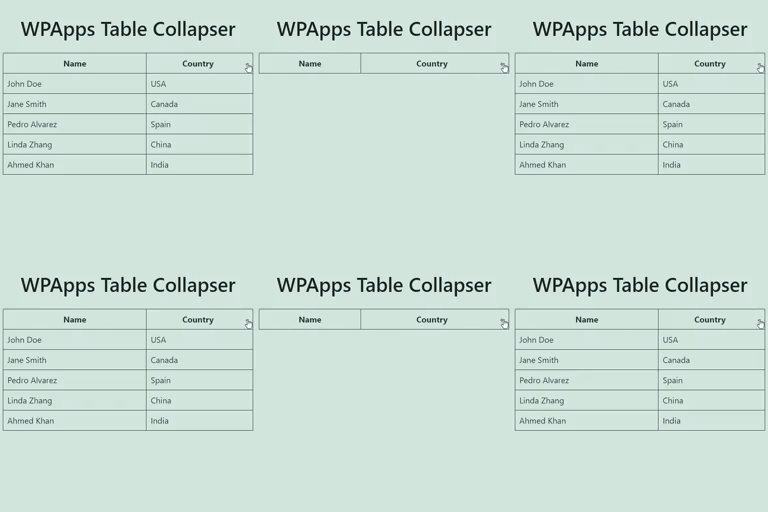
# WPApps Table Collapser
[Hefin Dsouza](https://profiles.wordpress.org/hefind/)-ৰ দ্বাৰা
[ডাউনল’ড কৰক](https://downloads.wordpress.org/plugin/wpapps-table-collapser.1.1.0.zip)
* [বিশদ বিৱৰণ](https://as.wordpress.org/plugins/wpapps-table-collapser/#description)
* [পৰ্য্যালোচনা](https://as.wordpress.org/plugins/wpapps-table-collapser/#reviews)
* [ইনষ্টলেশ্যন](https://as.wordpress.org/plugins/wpapps-table-collapser/#installation)
* [বিকাশ](https://as.wordpress.org/plugins/wpapps-table-collapser/#developers)
[সাহায্য](https://wordpress.org/support/plugin/wpapps-table-collapser/)
## বৰ্ণনা
WPApps Table Collapser is a lightweight plugin that makes your tables collapsible.
By adding a `collapsible-table` class to your tables, you enable users to toggle
the visibility of the table body by simply clicking on the table header.
### Features
* **Collapsible Tables:** Make any table collapsible by adding a simple class.
* **Toggle Indicator:** Automatically adds a `+/-` indicator to the last column
of the table header.
* **Customizable:** Style the toggle indicator and table appearance with your own
CSS.
* **Block Editor Support:** Includes a Gutenberg block for easy table creation
and collapsing functionality.
* **Mobile Friendly:** Works seamlessly on mobile devices with responsive design.
**Usage:**
1. Ensure that your table has a `` tag for the table header, though it’s not
mandatory if you enable the “Allow Table Without ``” option in settings.
2. Add the class `collapsible-table` to your table.
3. Optionally, add a `data-title` attribute to your table to set a custom title for
the mobile compact view.
4. The last column in the table header will have a toggle indicator (`+/-`) added
to it. Clicking anywhere in the header will show or hide the table body.
## স্ক্ৰীনশ্বট
* [[
* **Example of a Collapsible Table:**
* [[
* **Settings Page:**
* [[
* **Detailed Guidelines on CSS Customization:**
* [[
* **Responsive Table View:**
* [[
* **Block Support:**
## ব্লকবোৰ
এই প্লাগিনটোৱে 1টা ব্লক প্ৰদান কৰে।
* Table Collapser A block that makes tables collapsible.
## ইনষ্টলেশ্যন
1. Upload the `wpapps-table-collapser` folder to the `/wp-content/plugins/` directory.
2. Activate the plugin through the ‘Plugins’ menu in WordPress.
3. Add the `collapsible-table` class to any table you want to make collapsible.
## সঘনাই উত্থাপিত প্ৰশ্ন
### Does the table require any specific structure?
For optimal functionality, the table should have a `` tag defining the header.
The collapsing functionality is primarily activated by clicking on this header.
However, if you enable the “Allow Table Without ``” option in the settings,
the plugin will also work without a ``.
### Can I style the toggle indicator?
Yes, you can style the toggle indicator by targeting the `.toggle-indicator` class
in your CSS.
### How do I set a custom title for the mobile view?
You can add a `data-title` attribute to your table element to set a custom title
that will be displayed in the mobile compact view.
### Is the plugin compatible with the Gutenberg block editor?
Yes, the plugin includes a Gutenberg block for easy creation and management of collapsible
tables.
## পৰ্য্যালোচনা
এই প্লাগিনৰ বাবে কোনো পৰ্য্যালোচনা নাই।
## অৱদানকাৰী আৰু বিকাশকাৰীসকল
“WPApps Table Collapser” হৈছে মুক্ত উৎসৰ ছফ্টৱেৰ। এইসকল লোকে এই প্লাগিনত অৱদান আগবঢ়াইছে।
অৱদানকাৰীসকল
* [ Hefin Dsouza ](https://profiles.wordpress.org/hefind/)
[আপোনাৰ ভাষাত “WPApps Table Collapser” অনুবাদ কৰক।](https://translate.wordpress.org/projects/wp-plugins/wpapps-table-collapser)
### বিকাশৰ প্ৰতি আগ্ৰহী?
[ক’ড ব্ৰাউজ কৰক](https://plugins.trac.wordpress.org/browser/wpapps-table-collapser/),
[SVN ৰিপজিটৰী](https://plugins.svn.wordpress.org/wpapps-table-collapser/) চাওক নাইবা
[RSS](https://plugins.trac.wordpress.org/log/wpapps-table-collapser/?limit=100&mode=stop_on_copy&format=rss)-
দ্বাৰা [বিকাশৰ পঞ্জী](https://plugins.trac.wordpress.org/log/wpapps-table-collapser/)
ছাবস্ক্ৰাইব কৰক।
## সলনি-পঞ্জী
#### 1.1.0
* Fixed a bug where the block editor css gets loaded in the front-end.
#### 1.0.0
* Initial release.
## মেটা
* **1.1.0** সংস্কৰণ
* **2 বছৰ আগত** শেষবাৰ আপডে’ট হৈছিল
* সক্ৰিয় ইনষ্টলেশ্যন **10+**
* WordPress-ৰ সংস্কৰণ ** 4.0 বা তাতকৈ ওপৰৰ **
* ইমানলৈকে পৰীক্ষা কৰা হৈছে **6.6.5**
* PHP-ৰ সংস্কৰণ ** 5.6 বা তাতকৈ ওপৰৰ **
* ভাষা
* [English (US)](https://wordpress.org/plugins/wpapps-table-collapser/)
* [block](https://as.wordpress.org/plugins/tags/block/)[responsive table](https://as.wordpress.org/plugins/tags/responsive-table/)
[table](https://as.wordpress.org/plugins/tags/table/)[toggle](https://as.wordpress.org/plugins/tags/toggle/)
* টেগবোৰ
* [উচ্চখাপৰ ভিউ](https://as.wordpress.org/plugins/wpapps-table-collapser/advanced/)
## ৰে’টিংবোৰ
এতিয়ালৈ কোনো পৰ্য্যালোচনা দাখিল কৰা হোৱা নাই।
[Your review](https://wordpress.org/support/plugin/wpapps-table-collapser/reviews/#new-post)
[See all reviews](https://wordpress.org/support/plugin/wpapps-table-collapser/reviews/)
## অৱদানকাৰীসকল
* [ Hefin Dsouza ](https://profiles.wordpress.org/hefind/)
## সাহায্য
কিবা ক’বলগীয়া আছে? সহায় লাগে?
[সাহায্যৰ ফ’ৰাম চাওক](https://wordpress.org/support/plugin/wpapps-table-collapser/)