
বৰ্ণনা
This plugin add frontend editor to your web-site. The plugin is easy to use. Please create empty page for editor, put shortcode [alshc_post_editor] on the created page.
Click to “WP FRONTEND PUBLISH EDITOR” menu in admin console. Follow to the instructions: set users capabilities and select the created page.
স্ক্ৰীনশ্বট

Frontend editor page view 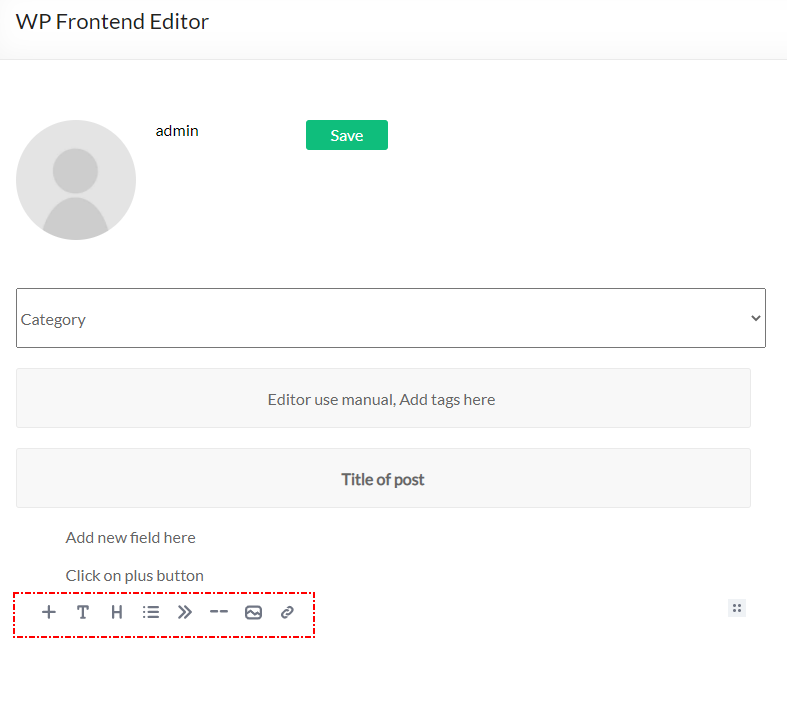
Frontend editor add new block 
Frontend editor change block features 
Backend editor menu item 
Backend editor manual 
Backend editor page selection 
Backend editor user capabilities
ইনষ্টলেশ্যন
- Upload plugin folder to the
/wp-content/plugins/directory - Activate the plugin through the ‘Plugins’ menu in WordPress
- Create a page for Editor
- Put shortcode [alshc_post_editor] on the created page
- Open setting page in admin console – “WP FRONTEND PUBLISH EDITOR”
- Follow to instructions:
6.1. Select the created page as Editor page
6.2. Cet users capabilities - Enjoy!
সঘনাই উত্থাপিত প্ৰশ্ন
-
What is Editor the plugin based on?
-
The plugin based on EditorJS (https://editorjs.io/). Based on documentation of the Editor this software is Open Source project. If you are interested in the Editor you can donate for the project.
-
How can I add blocks to the Editor
-
The Editor team develope new features for their project so you can update the editor from the project sources (https://editorjs.io/)
-
If I need any special features
-
Contact to author of this plugin for commercial support.
পৰ্য্যালোচনা
এই প্লাগিনৰ বাবে কোনো পৰ্য্যালোচনা নাই।
অৱদানকাৰী আৰু বিকাশকাৰীসকল
“AL Frontend Publish Editor” হৈছে মুক্ত উৎসৰ ছফ্টৱেৰ। এইসকল লোকে এই প্লাগিনত অৱদান আগবঢ়াইছে।
অৱদানকাৰীসকল
“AL Frontend Publish Editor” 1টা ভাষাত অনুবাদ কৰা হৈছে। অনুবাদকসকলক তেওঁলোকৰ অৱদানৰ বাবে ধন্যবাদ।
আপোনাৰ ভাষাত “AL Frontend Publish Editor” অনুবাদ কৰক।
বিকাশৰ প্ৰতি আগ্ৰহী?
ক’ড ব্ৰাউজ কৰক, SVN ৰিপজিটৰী চাওক নাইবা RSS-দ্বাৰা বিকাশৰ পঞ্জী ছাবস্ক্ৰাইব কৰক।
সলনি-পঞ্জী
1.0 Initial version.