

বৰ্ণনা
Code Engine is a snippets manager that doesn’t stop at snippets. Yes, it runs your PHP and JavaScript exactly where and when you want: frontend, backend, on a schedule, or inside your content. But its real magic is what happens after you write a function: the same little piece of code instantly becomes a tool your AI chatbots can call, a step you can drag into a visual workflow, and an endpoint the outside world can trigger. One function, three superpowers.
Most “code snippets” plugins stop at a textarea and a toggle. Code Engine treats your functions as first-class building blocks for the whole Meow Apps ecosystem, and for anything that can speak REST. Think out of the box, let your creativity flow, because the possibilities really are endless! ✨
For more, check the official website and come say hi on the Discord.
Quick Intro
Hello! ☀️ I built Code Engine because I was tired of pasting mystery snippets into functions.php and praying. I wanted a place where small bits of code are organized, safe, AI-assisted, and reusable everywhere.
Here’s the idea. You write a function (or let the AI write it for you from a plain-English description). That function immediately shows up in three places:
- AI Engine: your chatbots and MCP clients (Claude, ChatGPT, Claude Code) can call it as a tool, with real arguments. Ask “how many orders shipped today?” and your chatbot runs your function to answer.
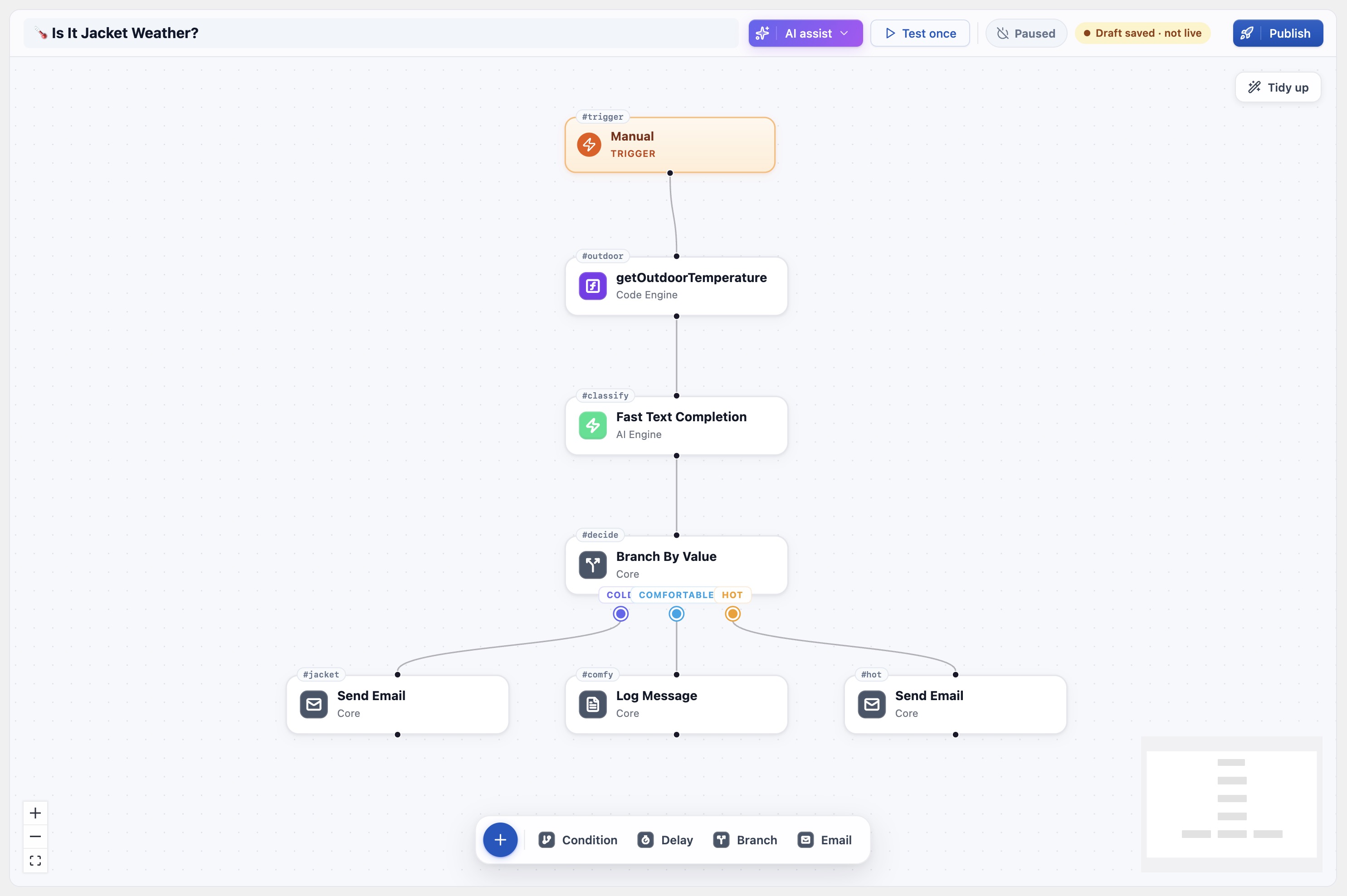
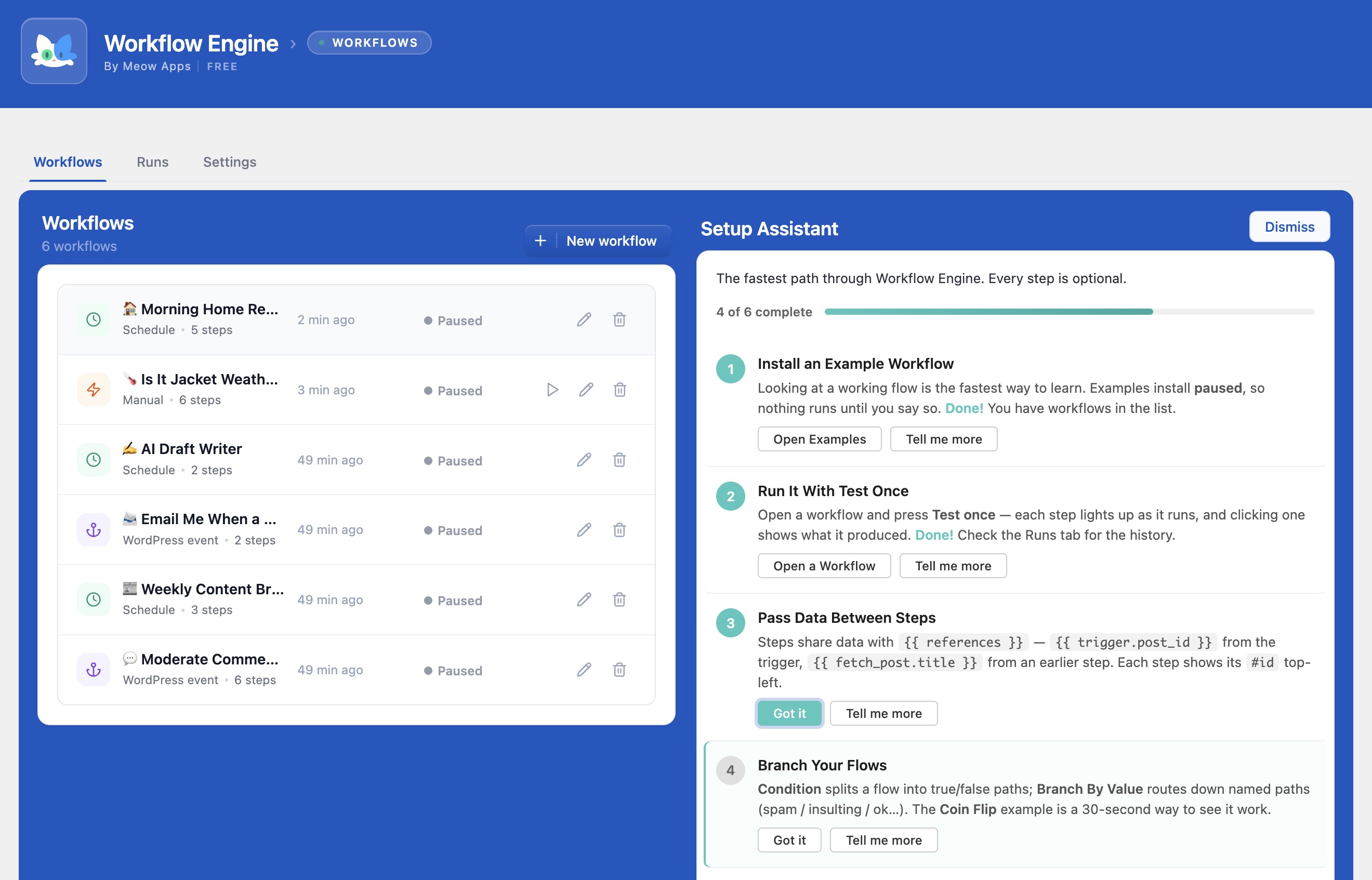
- Workflow Engine: your function appears in the step picker as its very own block. Drag it onto the canvas, wire it between an AI step and a Slack step, done. No glue code.
- REST / External tools: give it a secure endpoint and a token, then trigger it from Make.com, n8n, Zapier, a cron job, or a webhook.
You never wrote an “integration.” You just wrote a function. Code Engine did the rest. 🤝
Core Modules
🧩 Snippets Manager
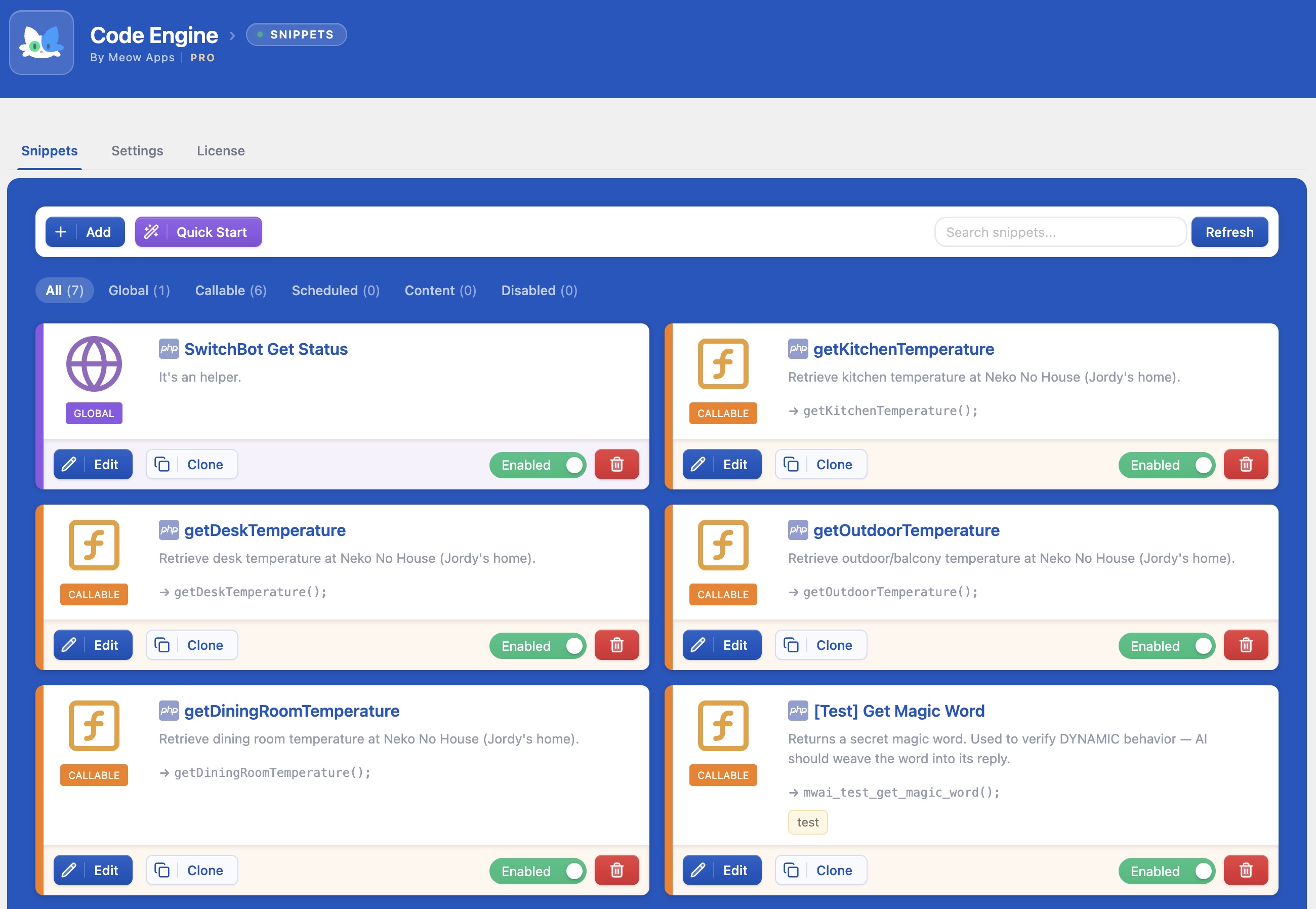
Backend, Frontend, Persistent, Scheduled, Functions, and in-content (PHP/JS) snippets, all in one clean dashboard with tags, search, scope filters, and priorities.
🪄 AI-Assisted Coding
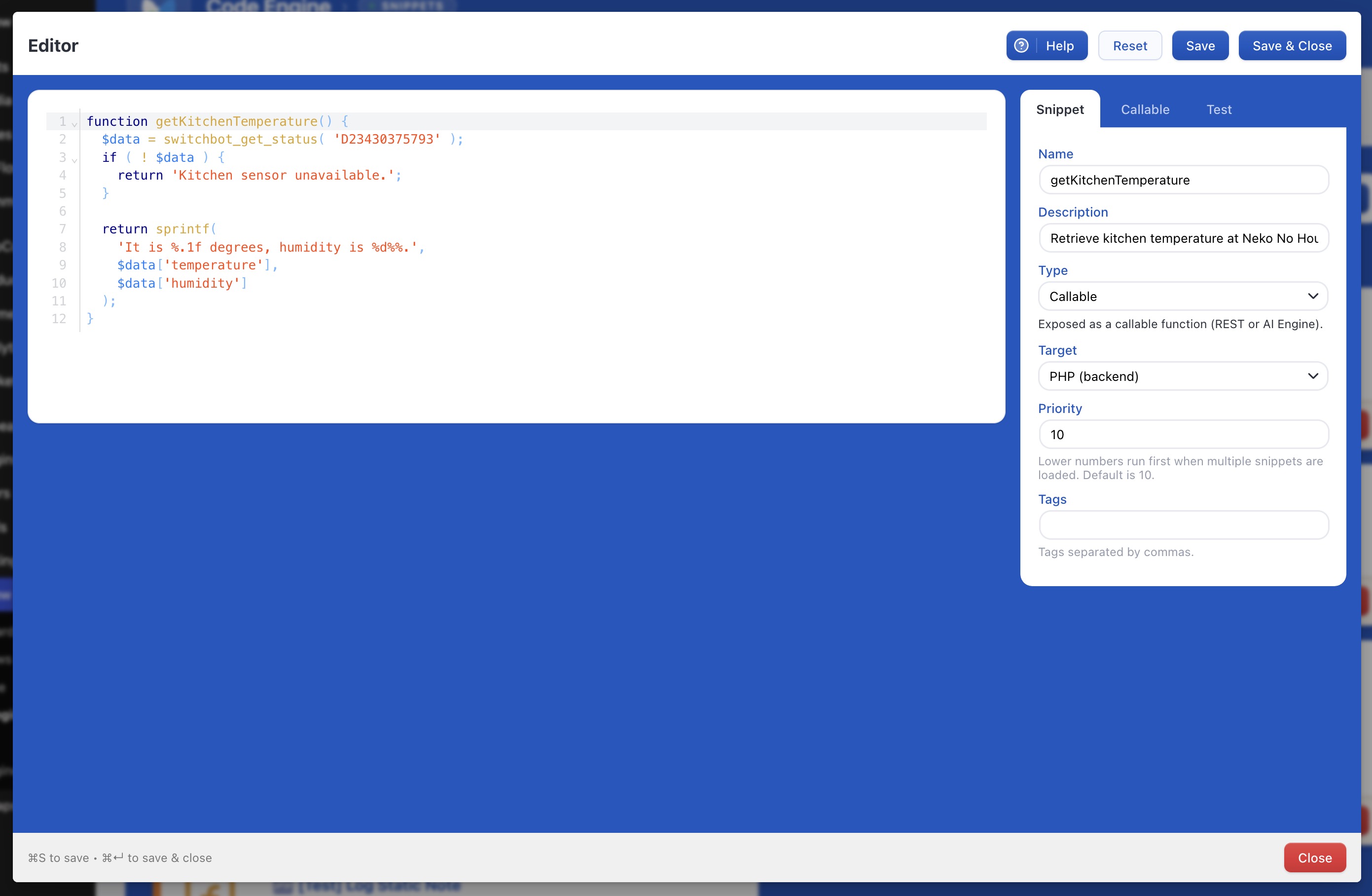
Describe what you want in plain English and let AI Engine write the snippet: code, name, arguments, and scope included. Refine existing code or implement it straight from your comments.
🤖 Functions as AI Tools
Every Function snippet becomes a function-calling tool and an MCP tool, so your AI Engine chatbots (and external AI agents) can actually do things on your site, not just talk.
🔀 Functions as Workflow Steps
Workflow Engine surfaces each of your functions as its own draggable step. Your custom logic becomes a first-class citizen on the automation canvas.
🌐 External Access (REST)
Expose any runnable snippet through a secured REST endpoint with a bearer token. Perfect for Make.com, n8n, webhooks, and scheduled external jobs.
🛡️ Safe Mode
A snippet that throws a fatal error is automatically caught and disabled before it can take your site down. Code with confidence.
⏰ Scheduling
Run a snippet daily at a chosen time via WP-Cron (reports, cleanups, syncs) without touching the server crontab.
🧱 Code Blocks & Shortcodes (Pro)
Drop PHP or JS straight into a post or page with a Gutenberg block or the [code-engine] shortcode, with safety guards.
🧩 Snippets, the way they should be
Code Engine organizes your code by scope, so each snippet runs exactly where it belongs:
- Persistent: runs everywhere (frontend and backend). Your everyday “add this to functions.php” code, but managed.
- Frontend: runs only on the public site.
- Backend: runs only in the admin.
- Function: a named, callable function with typed arguments and defaults. This is the reusable building block (see below).
- Scheduled: runs on a WP-Cron schedule, at the hour and minute you pick.
- Content (PHP / JS): runs inside a specific post or page, via a Gutenberg Code Block or the
[code-engine]shortcode (Pro).
Everything is searchable, taggable, sortable by priority, and importable/exportable. The CodeMirror editor gives you proper syntax highlighting and keyboard shortcuts (Cmd+S to save, Cmd+Enter to run). A nikic/php-parser pass validates your PHP before it ever runs.
🪄 Let AI write it for you
Don’t feel like writing the boilerplate? Describe the snippet in plain language and Code Engine, powered by AI Engine, generates the whole thing: the code, a sensible name, a description, the right scope, and, for functions, the argument list with names, types, and defaults.
Already have code? Ask the AI to modify it from a prompt, or write a few comments describing what you want and let it fill in the implementation. It’s pair programming, right inside your dashboard.
✨ The big idea: write once, use everywhere
This is what makes Code Engine different. A Function snippet is not just code you call from other code. It’s a reusable capability that the rest of your stack can plug into. The moment you save it, the same function is available in three places at once:
1. As an AI tool, for chatbots and AI agents
With AI Engine active, your functions are exposed through function calling and over MCP (Model Context Protocol). Your on-site chatbot can run them mid-conversation, and external AI agents (Claude, Claude Code, ChatGPT, OpenClaw) can call them too. Want a chatbot that checks stock, looks up a booking, or kicks off a process? Write the function; the chatbot gains the skill.
2. As a workflow step, for automation
With Workflow Engine, every active function shows up in the Add-step picker as its own block, named after your snippet, with one input per argument. Drag it onto the canvas and wire it between other steps: an AI step that summarizes, your function that saves, a Social Engine step that posts. There’s also a generic “Execute snippet (by ID / by name)” step when you want to call one dynamically. You never write integration code; your function is the integration.
3. As a REST endpoint, for the outside world
Give a snippet a custom endpoint name and a bearer token, and it’s instantly callable from anywhere:
POST /wp-json/code-engine/v1/snippets-endpoint/your-endpoint
Pass arguments as JSON in the body, secure it with a token, and trigger it from Make.com, n8n, Zapier, GitHub Actions, or a humble cron job. Automation without a middleware bill.
🛡️ Safe by default
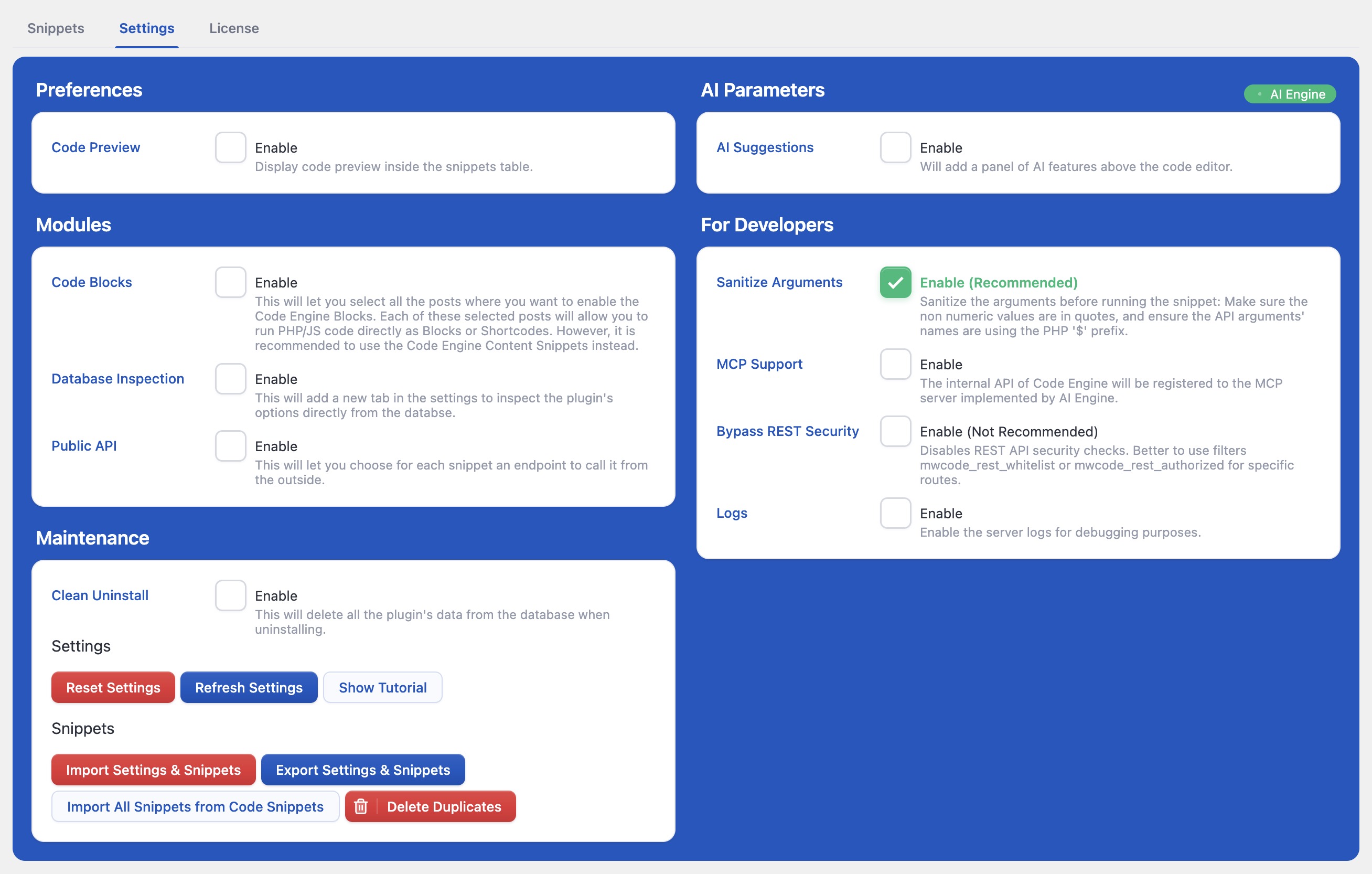
Running arbitrary code is powerful, so Code Engine takes safety seriously:
- Safe Mode catches fatal errors and auto-disables the offending snippet, so a typo never white-screens your site.
- REST whitelisting means global snippets only run on trusted REST routes by default, so you choose what to open up.
- Per-snippet tokens secure your external endpoints.
- Validation with a real PHP parser before code is saved.
For developers who want fewer guardrails, there’s a “Bypass REST Security” option and filters (mwcode_rest_authorized, mwcode_rest_whitelist) to tailor exactly what’s allowed.
Works beautifully with the Meow Apps family
Code Engine is one engine in a connected set, each one useful alone, magical together:
- AI Engine: chatbots, content generation, and MCP. Turns your functions into AI tools.
- Workflow Engine: visual automation. Turns your functions into draggable steps.
- SEO Engine: smart, lightweight AI SEO.
- Social Engine: schedule and automate social posts.
Why Code Engine?
Reusable, not throwaway
Other snippet plugins give you a place to paste code. Code Engine gives you a place to build capabilities that your AI, your workflows, and your external tools can all use.
Native to WordPress
Clean, fast, and built the WordPress way. No clunky external dashboards, no bloat.
AI-native
Write snippets with AI, expose them to AI. The whole loop lives in your wp-admin.
Developer friendly
REST API, MCP tools, function calling, scheduling, import/export, and plenty of filters to hook into.
Cared for
Part of the Meow Apps family, with regular updates and a real human behind it. 💕
স্ক্ৰীনশ্বট
ইনষ্টলেশ্যন
- Upload
code-engineto the/wp-content/plugins/directory (or install it from the Plugins screen). - Activate the plugin through the ‘Plugins’ menu in WordPress.
- Head to Meow Apps Code Engine and create your first snippet.
- (Optional) Install AI Engine to write snippets with AI and expose your functions as chatbot tools.
- (Optional) Install Workflow Engine to use your functions as visual workflow steps.
সঘনাই উত্থাপিত প্ৰশ্ন
-
What’s the difference between a snippet and a Function?
-
A regular snippet (Persistent, Frontend, Backend, Scheduled, Content) runs automatically based on its scope. A Function is a named, callable snippet with arguments. It runs on demand, and that’s exactly what makes it reusable as an AI tool, a workflow step, or a REST endpoint.
-
Do I need AI Engine or Workflow Engine to use Code Engine?
-
No. Code Engine is a fully capable snippets manager on its own. AI Engine unlocks AI-assisted writing and exposes your functions as AI tools; Workflow Engine turns your functions into visual steps. Each is optional, but together they’re where the fun begins. 😊
-
How do my functions become AI tools?
-
With AI Engine active, Code Engine registers your functions through function calling and MCP. Your on-site chatbots can call them, and external AI agents (Claude, Claude Code, ChatGPT, OpenClaw) can too. Each argument you declare becomes a parameter the AI can fill in.
-
How do I call a snippet from Make.com, n8n, or a webhook?
-
Give the snippet a custom endpoint name and a token, then send a request to
/wp-json/code-engine/v1/snippets-endpoint/your-endpointwith your arguments as JSON. By default, global snippets only run on whitelisted REST routes for safety. You can adjust this in Settings or with themwcode_rest_whitelistandmwcode_rest_authorizedfilters. -
Is it safe to run code like this?
-
Code Engine includes Safe Mode, which catches fatal errors and automatically disables the snippet that caused them, so a mistake won’t bring your site down. PHP is also validated with a real parser before it’s saved. As always, only run code you understand and trust.
-
Can I schedule a snippet to run automatically?
-
Yes. Use the Scheduled scope and pick an hour and minute; Code Engine runs it daily via WP-Cron, great for reports, cleanups, and syncs.
-
Can I move my snippets between sites?
-
Yes. Code Engine supports importing and exporting your snippets and settings, so you can back them up or move them to another site.
পৰ্য্যালোচনা


অৱদানকাৰী আৰু বিকাশকাৰীসকল
“Code Engine – PHP Snippets, AI Functions & Automation for WordPress” হৈছে মুক্ত উৎসৰ ছফ্টৱেৰ। এইসকল লোকে এই প্লাগিনত অৱদান আগবঢ়াইছে।
অৱদানকাৰীসকল
“Code Engine – PHP Snippets, AI Functions & Automation for WordPress” 1টা ভাষাত অনুবাদ কৰা হৈছে। অনুবাদকসকলক তেওঁলোকৰ অৱদানৰ বাবে ধন্যবাদ।
আপোনাৰ ভাষাত “Code Engine – PHP Snippets, AI Functions & Automation for WordPress” অনুবাদ কৰক।
বিকাশৰ প্ৰতি আগ্ৰহী?
ক’ড ব্ৰাউজ কৰক, SVN ৰিপজিটৰী চাওক নাইবা RSS-দ্বাৰা বিকাশৰ পঞ্জী ছাবস্ক্ৰাইব কৰক।
সলনি-পঞ্জী
0.5.7 (2026/09/14)
- Fix: Avoid a PHP warning caused by a null value in an in_array check.
0.5.6 (2026/08/20)
- Add: Plugins board in the Meow Apps dashboard.
- Add: AI site analysis in the Meow Apps dashboard.
- 🎵 Discuss with others about Code Engine on the Discord.
- 🌴 Keep us motivated with a little review here. Thank you!
- 🥰 If you want to help us, check our Patreon. Thank you!
0.5.5 (2026/07/18)
- Fix: Callable snippets losing arguments when parameter names contained a dollar sign prefix or had empty/zero values.
0.5.4 (2026/07/16)
- Fix: Callable snippets losing their arguments and throwing syntax errors when invoked.
0.5.3 (2026/07/06)
- Fix: Hotfix — MCP snippet updates now correctly update in place instead of creating a new row, resolving “Could not insert the snippet” errors on SQLite backends.
- Update: MCP tools are now protected against snippet fatal errors.
- Update: Clarified MCP tool scope and option descriptions.
- Add: Content (PHP/JS) snippets are now accessible through the MCP management API.
0.5.2 (2026/06/30)
- Update: MCP toggles now enable when AI Engine is active, instead of requiring a configured API key.
0.5.1 (2026/06/28)
- Add: MCP support for Callable snippets, with a master switch in Settings (disabled by default) and per-snippet opt-in required.
0.5.0 (2026/06/26)
- Add: per-function “Expose via MCP” toggle to register a Callable snippet as its own tool on AI Engine’s MCP server, with status badge and list filter
- Update: redesigned snippet Type selector to four simplified choices (Global, Callable, Scheduled, Content) with a contextual sub-option
- Update: reworked Callable Destinations into a compact expandable list with clear on/off status
- Update: moved Clone and Delete actions on snippet cards into a More menu
- Update: code editor now fills the full modal height and no longer shows a dotted focus outline
0.4.9 (2026/06/14)
- Add: Callable tab panel showing where a function can be used (AI Engine, Workflow Engine, REST) with copy buttons.
- Fix: No longer sends a blank argument name for callable functions with no parameters.
- Update: Rewrote the readme with a new description and added screenshots.
0.4.8 (2026/06/13)
- Fix: Meow Apps menu icon now stays colored and visible when the sidebar is collapsed.
- Update: Common REST and license endpoints now honour the
{prefix}_allow_setupfilter, allowing other roles to be granted access. - Fix: Function snippets now correctly call other function snippets and global helpers when run on demand.
- Add: Scope filter to the Snippets toolbar, with grouped Content (PHP/JS) options and Disabled at the end.
- 🎵 Discuss with others about Code Engine on the Discord.
- 🌴 Keep us motivated with a little review here. Thank you!
- 🥰 If you want to help us, check our Patreon. Thank you!
0.4.7 (2026/05/07)
- Update: Reworked the Editor UI modal with improved spacing.
- Add: Help Toggle in the Editor UI modal.
0.4.6 (2026/04/25)
- Fix: Removed unwanted log output.
- Add: Ability to delete duplicate snippets.
- Update: Snippet import now includes ‘content’ in scope conversion.
- Update: Better UI/UX.
0.4.5 (2026/04/15)
- Fix: Resolved potential error when using older versions of AI Engine by adding a compatibility check.
- Update: Switch to AI Engine’s new hasAI() helper for more reliable detection of AI availability.
- Fix: Improve the AI suggestion UI/UX.
0.4.3 (2026/03/09)
- Add: Tooltips to help the users better.
- Update: Simplified and refreshed the UIs.
- 🎵 Discuss with others about Code Engine on the Discord.
- 🌴 Keep us motivated with a little review here. Thank you!
- 🥰 If you want to help us, check our Patreon. Thank you!
0.4.2 (2025/12/16)
- Add: Added shortcode attributes.
- Fix: Improved DB checks with an early return to reduce unnecessary queries.
0.4.1 (2025/12/03)
- Fix: Ensure blocks keep the correct context when focused by improving how block properties are handled.
- Fix: Restore proper behavior of the Code Blocks option and its settings tab.
- Add: Allow usage of PHP tags to create HTML line breaks in content.
- 🎵 Discuss with others about Code Engine on the Discord.
- 🌴 Keep us motivated with a little review here. Thank you!
- 🥰 If you want to help us, check our Patreon. Thank you!
0.4.0 (2025/11/12)
- Add: Enhanced the overall UI/UX for better user experience.
- Add: Keyboard shortcuts (Cmd+S, Cmd+Enter).
- Add: Included a “Clean Uninstall” option for easier plugin removal.
- Update: Reorganized plugin interface into tab-only layout.
- Fix: Hotfix to prevent other actions during code validation.
- Fix: Export of snippets.
0.3.9 (2025/10/10)
- Add: Implemented CMD+S as a shortcut to save snippets.
- Fix: Resolved an undefined array key warning related to ‘target’.
- Update: Ignore __mwai_ arguments in the editor for cleaner operation.
- Update: Enhanced the UI/UX.
0.3.8 (2025/09/30)
- Update: Improved the entire UI for a better user experience.
- Fix: Ensure mwai_query parameter is correctly passed and accessible within function calls.
0.3.7 (2025/09/01)
- Update: Code Engine Pro.
0.3.6 (2025/08/16)
- Update: There is now a Pro version for Code Blocks and Shortcodes.
- Update: Minor improvements and bug fixes.
0.3.5 (2025/07/23)
- Fix: Resolved React rendering issue caused by empty tags and undefined map calls.
- Update: Refreshed common functionalities for improved stability.
0.3.4 (2025/07/06)
- Update: Disallow PHP execution in code blocks by default, with an option to enable it.
- Update: Refactored the getSnippets method for improved stability.
- Update: Changed snippet name filtering to use ‘functionName’ instead of ‘name’.
- Fix: Allowed global snippets to execute on the Settings page to prevent blocking nonce filters.
0.3.3 (2025/06/29)
- Add: Support for “content” scope in dashboard and tags.
- Fix: Editor modal not displaying correctly.
- Fix: Columns and empty message now display as expected.
- Update: Renamed MCP tool prefix from code_engine_ to mwcode_ for better consistency.
- Update: Check DISALLOW_UNFILTERED_HTML for JavaScript content type snippets to enhance security.
- Update: Replaced error_log with core logging in API for improved reliability.
- Fix: Dashboard disables Quick Start if AI Engine is missing.
- Fix: Added missing dependencies to mwcode_snippet_vault script registration.
0.3.2 (2025/06/03)
- Add: API now matches the functionality of AI Engine and includes optional MCP support.
- Add: Security bypass option and reorganized plugin settings for easier management.
- Update: Shortened filter names to mwcode_rest_whitelist and mwcode_rest_authorized for clarity.
- Fix: Hotfix—adjusted to use ‘size’ parameter instead of ‘fullSize’, resolving compatibility issues.
- Fix: Resolved error_log spam, clarified REST route blocking messages, corrected typos, and improved code readability.
0.3.1 (2025/05/22)
- Fix: Prevent errors when processing snippets by removing an unnecessary argument from the sanitize function.
- Update: Improve the code editor’s appearance by adjusting how content overflows, ensuring the border radius displays correctly.
0.3.0 (2025/05/01)
- Add: Introduced API functions to create, update, and delete snippets via PHP Callables.
- Fix: Ensured PHP Callables avoid typed arguments to prevent InvalidArgumentException.
- Update: Refactored ContentBlock to use the CodeEditor component and removed unnecessary ID handling.
- Fix: Sanitized arrays and converted strings to arrays for safer callable argument handling.
- Fix: Corrected a return statement that was blocking the PHP Callable test tab.
- Add: Added a proof of concept for a Gutenberg block.
0.2.9 (2025/02/17)
- Fix: Corrected split function to handle null arguments properly.
- Add: Enabled the “Test” tab for all snippet types for better testing.
- Update: Refactored Quick Start snippet generation and introduced AI-powered snippet creation.
- Update: Removed Shortcode.js and cleaned up debug logs to improve code clarity.
- Update: Improved snippet execution by adding load.php and enhancing error handling.
- 💕 Discuss with others about it on Discord.
- 🌴 Keep us motivated with a little review here. Thank you!
0.2.8 (2025/01/04)
- Update: Refactored core class for better performance.
0.2.7 (2024/12/06)
- Fix: Insertion of the code generated by AI.
- Update: Visual enhancements.
- Update: Clean uninstall.
0.2.6 (2024/11/04)
- Update: Better editor, cleaner and more efficient.
- Add: Little tutorial, to help you get started.
- Fix: Avoid useless re-renders.
0.2.5 (2024/10/17)
- Update: Better code editor. Decoration for tags.
- Update: Added “Function Calling” next to Callable.
- Fix: Whitelist for REST to avoid issues.
- Fix: Many fixed and enhancements for AI Suggestions.
- Fix: Minor issues.
0.2.4
- Fix: Jumpy cursor and functions not available via API (0.2.3 specific issues).
- Add: Check the function name, and Sanitize.
- Fix: Lot of minor issues.
0.2.2
- Update: Better error handling.
- Update: Better logger.
0.2.1
- Update: Better AI suggestions and improved UI.
- Fix: Avoid the Code Editor to be suddently updated by external factors.
0.2.0
- Fix: Settings display.
- Update: JS functions are now also available in the admin.
0.1.9
- Update: A bunch of improvements to make Code Engine even more awesome! Basically, the UI became slighlty better to use, and the features are more stable.
0.1.8 (2024/07/16)
- Update: UI overhaul, with a new design, icons, and more.
- Add: Types for arguments.
- Fix: Got rid of some warnings and errors.
0.1.6 (2024/07/07)
- Add: Scheduling via WP events.
- Fix: Exclude disabled functions from functions list in the API.
- Update: Disabled Safe Mode for frontend snippets.
- Update: Various fixes and optimizations.
0.1.5 (2024/06/23)
- Update: Lots of little UI improvements.
- Fix: Escape value in sanitize function and correct import snippet primary key and tag validation.
- Fix: Ensure arrays are displayed in test logs and sanitize functions when saving.
0.1.4 (2024/06/15)
- Fix: If functions already exist, to avoid conflicts, the snippet will be disabled.
- Update: Scopes are now Backend, Frontend, Function, Persistent, and Scheduled.
- Update: Improved the styles.
0.1.3
- Fix: Resolved issue with Common Dashboard visibility when only Code Engine is used.
- Update: Enhanced UI with multiple component refactors and minor changes.
- Fix: Improved API functionality with secure query args decoding and request body support.
0.1.2
- Update: Disable Safe Mode for Admin (which is enabled by default).
- Update: Improved flow with AI Engine.
0.1.1
- Add: Import/Export Snippets & Settings.
0.1.0
- Update: Implemented version control for database updates with optimized queries.
- Update: Simplified database column declarations and improved compatibility by removing default values from ‘created’ and ‘updated’ fields.
0.0.9
- Update: Many enhancements around error handling and UI.
0.0.8
- Fix: Secondary way of checking the database if needed.
- Fix: Automatically disable snippets if they trigger a fatal error.
0.0.7
- Fix: Corrected UI behaviors including Test window size and wrapping, default tab selection in Edit modal, and default snippet name setting for Functions.
- Update: Enhanced error handling in “Test” mode to display errors instead of throwing them.
- Update: Eliminated “All” option from the Type Select dropdown.
0.0.6
- Add: Settings for developers.
- Fix: Minor issues.
0.0.5
- Update: Arguments with no default value are automatically marked as required.
0.0.2
- Info: Revamped release.
0.0.1
- Info: Old release.