
বৰ্ণনা
This plugins enables the famous Google +1-button in your wordpress-installation. The button is shown beneath
your posts/pages. With this button you can share the permalink to your post/page in your Google+ profile.
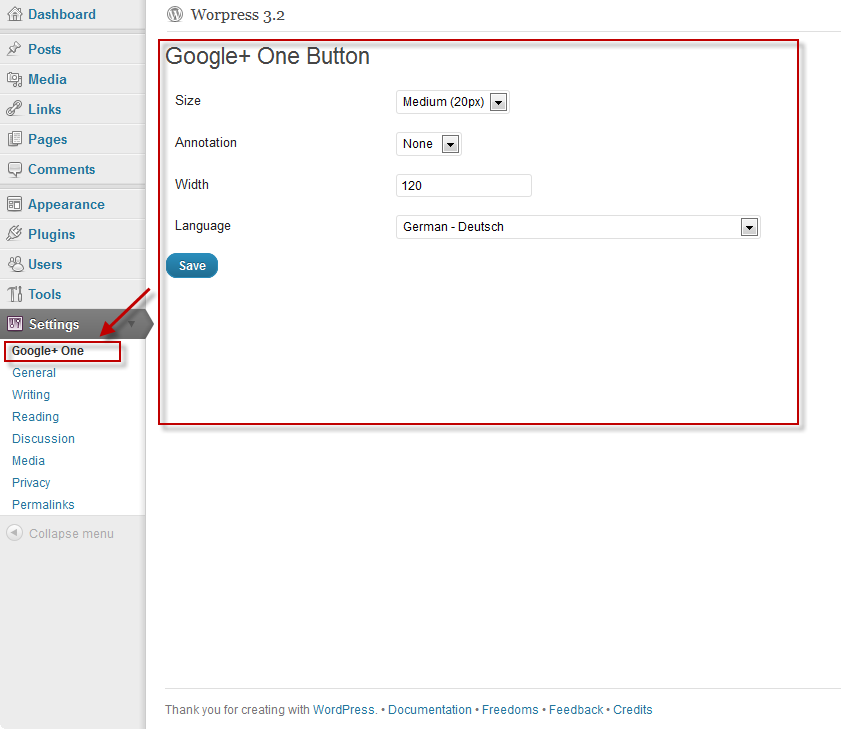
You’ve got the possibility to change the look of the button in the same manner, that you can do by using the
configurator that Google provides: see Google plus one.
স্ক্ৰীনশ্বট

ইনষ্টলেশ্যন
- Upload
googleplusone.phpto the/wp-contents/plugins/directory - Activate the plugin through the ‘Plugins’ menu in WordPress
- Configure the look & feel of the button in the settings-section of the backend
সঘনাই উত্থাপিত প্ৰশ্ন
- Does this plugin need any additional database-tables?
-
No this plugin doesn’t need any additional database-tables. The configuration of the plugin however is stored within
theoptions-table
পৰ্য্যালোচনা
এই প্লাগিনৰ বাবে কোনো পৰ্য্যালোচনা নাই।
অৱদানকাৰী আৰু বিকাশকাৰীসকল
“Google+ One Button” হৈছে মুক্ত উৎসৰ ছফ্টৱেৰ। এইসকল লোকে এই প্লাগিনত অৱদান আগবঢ়াইছে।
অৱদানকাৰীসকল
আপোনাৰ ভাষাত “Google+ One Button” অনুবাদ কৰক।
বিকাশৰ প্ৰতি আগ্ৰহী?
ক’ড ব্ৰাউজ কৰক, SVN ৰিপজিটৰী চাওক নাইবা RSS-দ্বাৰা বিকাশৰ পঞ্জী ছাবস্ক্ৰাইব কৰক।
সলনি-পঞ্জী
1.0
- First release of the plugin