

বৰ্ণনা
Google Ads can optimise for what you report to it, and nothing more. If all you report
is button clicks, that is what it buys you: clicks. The sale that closed three weeks
later, on WhatsApp, by a phone call your CRM never saw, is invisible to the bidding
algorithm.
MasVirtual Lead Tracking closes that loop. It records where every visitor came from, keeps that origin
attached to the lead through your sales funnel, and reports back to Google Ads at each
stage — in the browser for the contact itself, and by offline conversion import for the
qualified lead and the closed sale, which happen weeks later when nobody is on the page
anymore.
The WhatsApp button is part of it because that is where these conversations start, and
because a click that is not measured cannot be attributed. But the button is the input,
not the point: the point is that “campaign arl-transporte produced 3 sales worth
9,600,000” becomes a sentence you can read, and that Google Ads can bid on.
What this version does
- Captures ad click identifiers (Google, Meta, Microsoft, TikTok), UTM parameters and
the referrer for every visitor, not just paid ones. - Stores first touch and last touch separately, because they rarely match.
- Renders the floating button, with configurable icon, size, color, shape, position
and business hours. - Measures clicks on any WhatsApp link on the page, including the ones added by
your theme, an Elementor button or another plugin, and the ones that appear after
the page loads. - Routes the click across several recipients, by rotation, by weight or by schedule,
and can create the lead already assigned to a sales rep. - Different messages per page, per content type or per traffic source: you can
greet someone who arrived from an ad differently. [mvlt_whatsapp]shortcode and a Gutenberg block.- Configurable retention with automatic purging, wired into the WordPress privacy
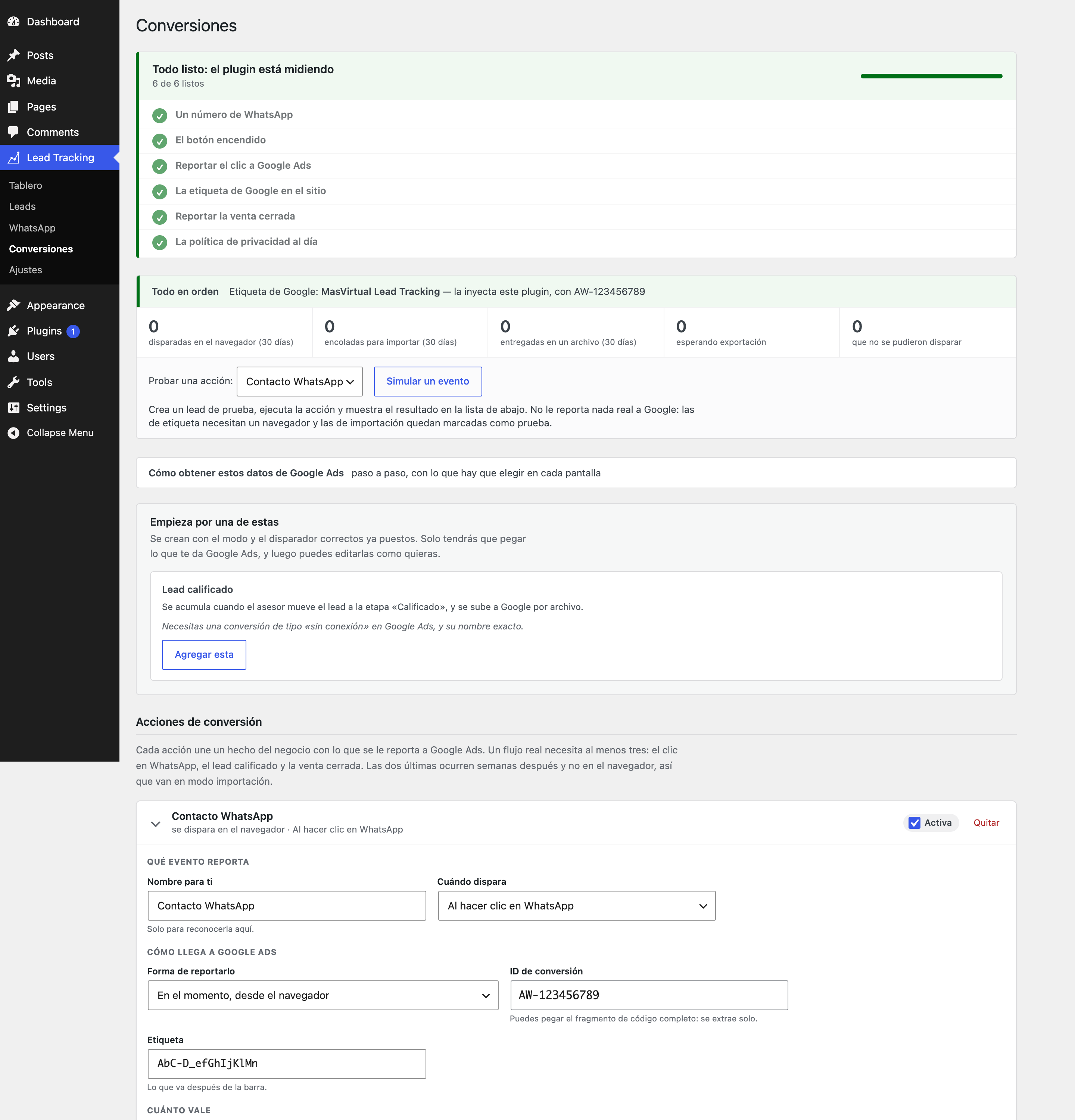
tools. - Reports conversions to Google Ads: in the browser with gtag for what happens on the
page, and through CSV import for what happens weeks later, when a sales rep marks
the sale as won. - A diagnostics screen that answers “is this working?” without opening the console,
with every warning explained and a button to simulate an event.
What it does not do yet
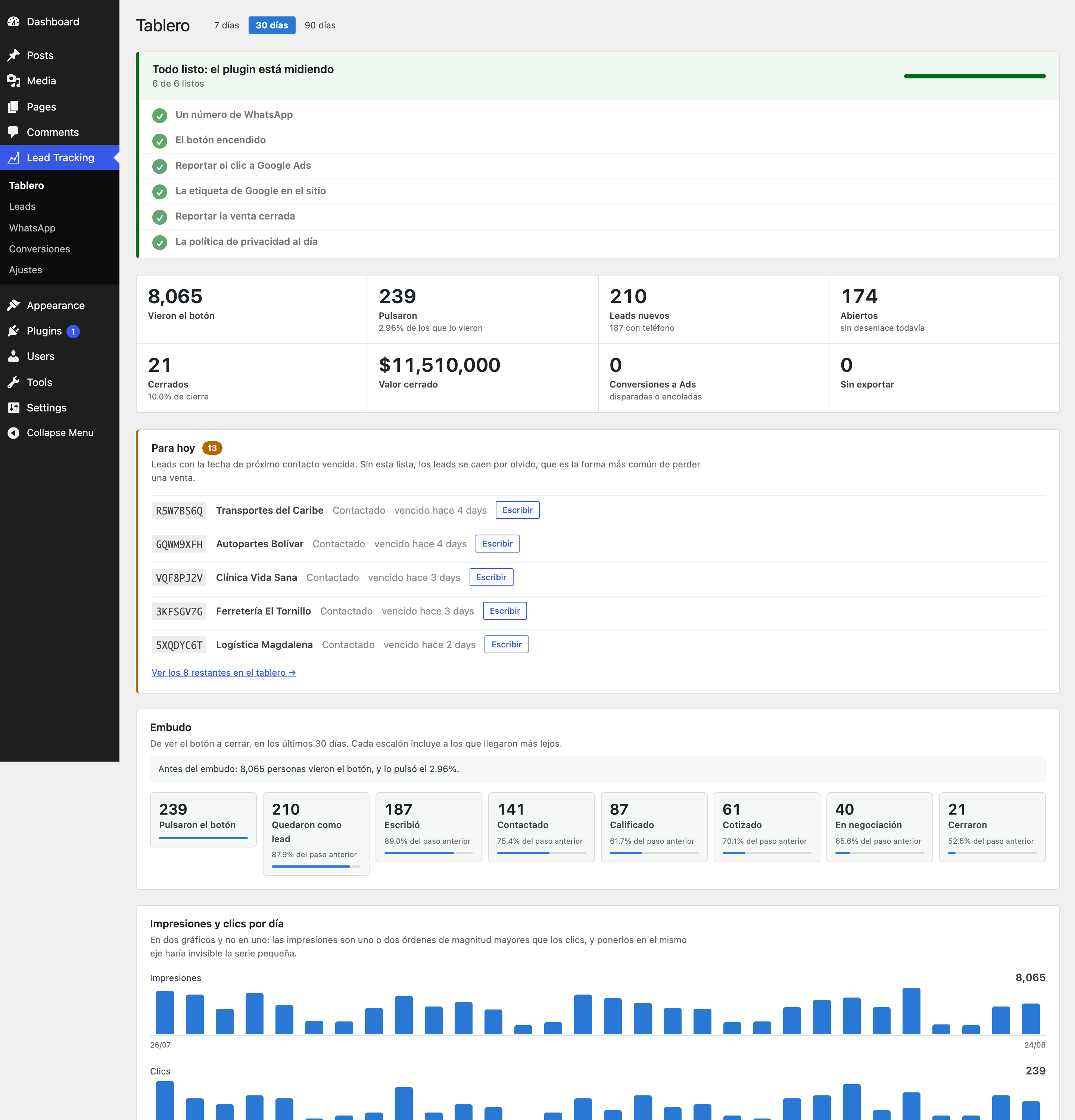
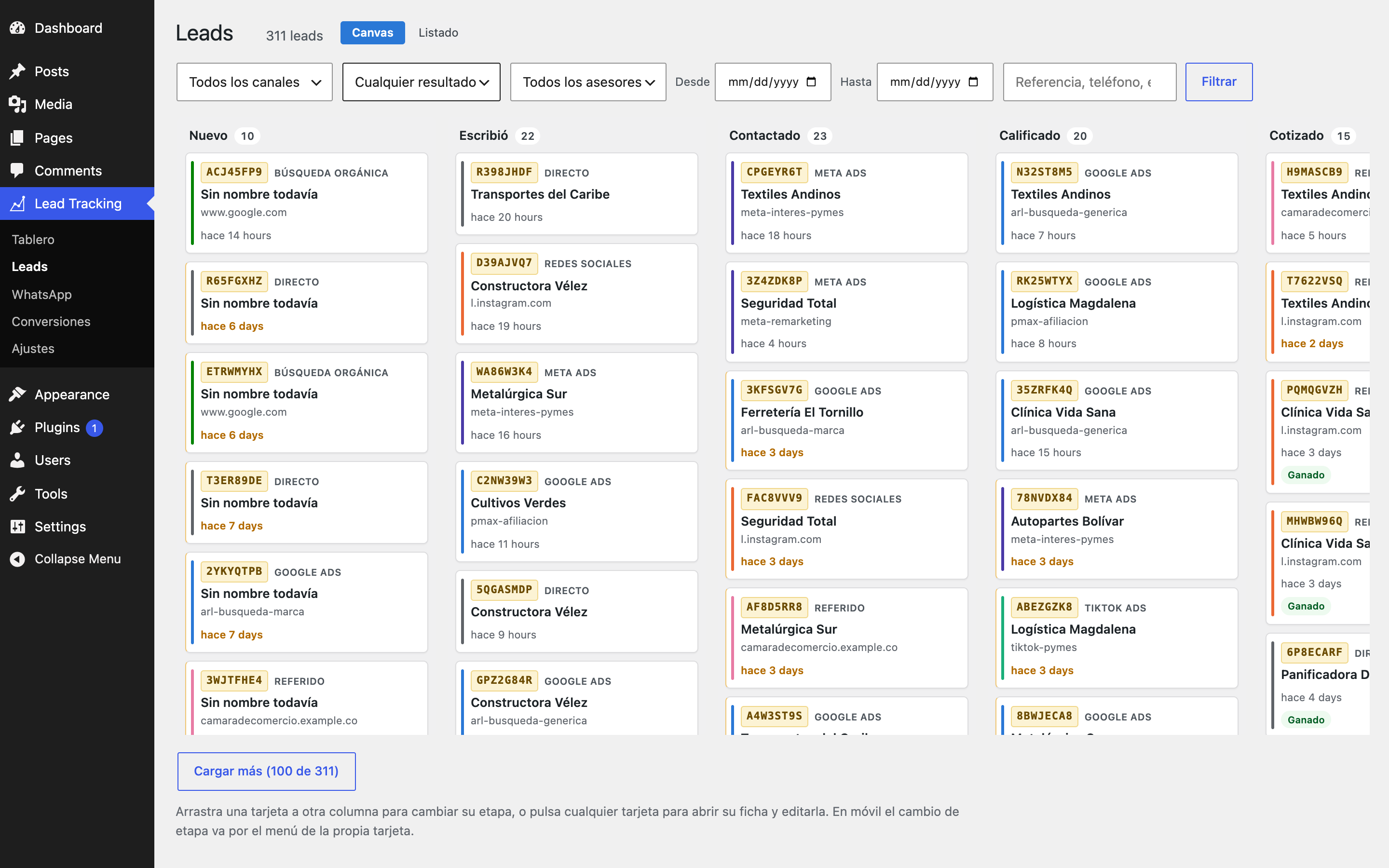
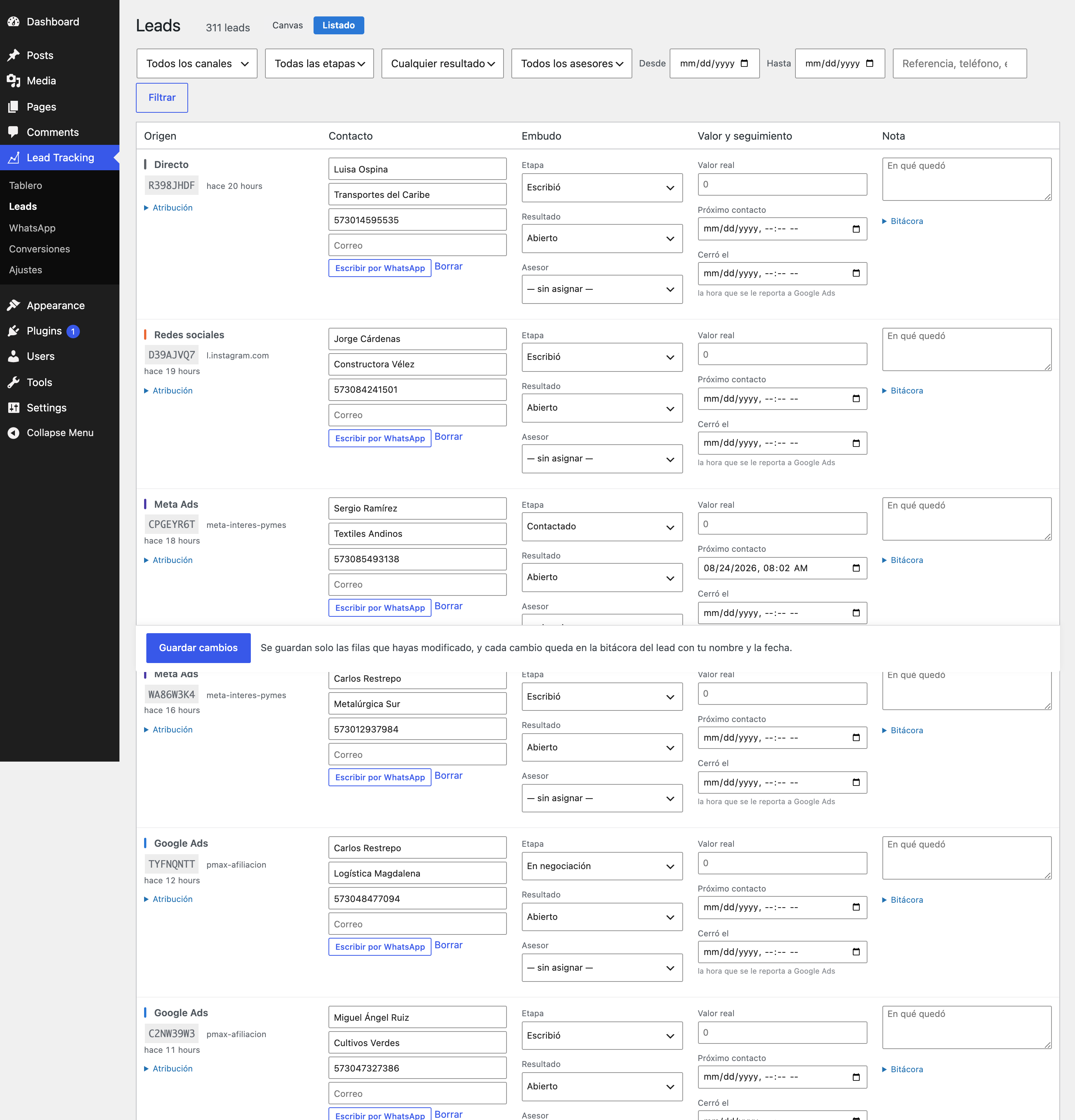
The drag-and-drop lead board with columns, and outgoing webhooks to n8n or a CRM, are
coming in the next release. Leads are already stored in full: nothing captured today
is lost when those arrive.
About the reference in the message
MasVirtual Lead Tracking appends a short reference to the prefilled message, like Ref: [#K7M2QF83].
That is what lets you match the message arriving in WhatsApp with the campaign that
produced it.
Know this before you trust the number: between 15% and 30% of users delete the
prefilled text before sending. Those leads cannot be matched. That is a WhatsApp
limitation, not a plugin one, and the only real mitigation is to push a form as the
primary channel when exact attribution matters.
You can also place the reference mid-message using the {ref} placeholder, which
survives partial deletion better than a trailing line does.
Privacy
Click identifiers are personal data under the GDPR in Europe, and under Law 1581 of
2012 in Colombia. Storing them makes the site operator a data controller.
Add a paragraph to your privacy policy along these lines:
When you visit this site we store, for up to 90 days, the advertising identifier
that came with your visit (for example the Google Ads one), the campaign parameters
in the URL, the address of the page you arrived from, and a random identifier for
your browser. We do this to know which campaigns generate real enquiries. If you
contact us on WhatsApp, we associate that data with your message. You may request
access to or deletion of this information by writing to [your contact address].
The plugin reads the Google Consent Mode v2 state and acts accordingly: without
consent it writes no first-party cookie and keeps only the identifiers that do not
depend on cookies.
What it stores in the browser, with consent, is this and nothing else:
wl_v— a first-party cookie holding a random browser identifier. The server
writes it, it isHttpOnlyandSameSite=Lax, and it expires after the number of
days set as the attribution window. No script reads it, neither this plugin nor any
other on the page.wl_f,wl_l,wl_uid,wl_turno,wl_vp— inlocalStorage. These are not
cookies and travel in no request: first touch, last touch, the lead reference, the
assigned sales rep, and the browser-proposed visitor identifier used only until the
server issues thewl_vcookie. The proposed value is deliberately named
differently from the cookie, because they are two separate things.
There are no third-party cookies and no identifiers shared with anyone.
Conversion feed (optional, disabled by default). If you enable it, the plugin
publishes a URL with a random 48-character key so that Google Ads can collect
conversions on its own schedule. That URL serves a CSV containing Google click
identifiers, sale values and conversion action names, and it is readable by anyone who
knows it: Google cannot authenticate against WordPress. It contains no names, phone
numbers or email addresses. The key can be rotated at any time, which invalidates the
previous URL immediately.
External services
The plugin works without contacting any server of ours: it sends no telemetry, phones
nobody home, and requires no account or key. Everything it captures stays in the
site’s own database.
Two third-party services are involved, both by explicit decision of the administrator:
Google tag (gtag.js). Only if you tick “let MasVirtual Lead Tracking load the Google tag” under
Conversions, which ships disabled. It loads
https://www.googletagmanager.com/gtag/js and sends Google Ads the conversion event
with the identifier, label, value and currency you configured, plus the click
identifier Google placed in the URL. If your site already loads the tag through Site
Kit, GTM or a theme snippet, the plugin detects it and does not duplicate it. Google
terms and privacy: https://policies.google.com/terms ·
https://policies.google.com/privacy
WhatsApp. The button and the links in your content point to https://wa.me, the
official WhatsApp redirector. Nothing is sent to Meta from the server: it is the
visitor who navigates there on tap, with the number and message in the URL, exactly as
with any WhatsApp link. WhatsApp terms and privacy:
https://www.whatsapp.com/legal/terms-of-service ·
https://www.whatsapp.com/legal/privacy-policy
About imported conversions
Conversions that happen after the visit — a qualified lead, a closed sale — cannot be
reported from the browser, because the visitor is no longer there. They accumulate and
are uploaded to Google Ads by file.
Every row carries the event time with the site’s UTC offset stated explicitly, and an
order identifier derived from the lead reference. That identifier is what lets you
upload the same file twice without duplicating conversions.
Before writing each row the plugin validates that the conversion is later than the
click, that no more than 90 days have passed, and that the identifier is of a type
Google accepts through this route. Rows that fail are shown on screen with the reason,
never dropped silently: a conversion that disappears without explanation is worse than
an error, because the team believes it was reported.
Rows whose problem can never be fixed — a lead that arrived through an unpaid channel,
a gbraid/wbraid identifier, a conversion already past the 90-day window — are
discarded with their reason recorded in the lead’s history, so the “pending” counter
only ever shows work that still exists. Rows you can still fix, such as an action
missing its Google Ads name, stay pending on purpose.
To automate the upload without a file, GET /wp-json/mvlt/v1/pendientes returns
already-validated conversions and POST /wp-json/mvlt/v1/exportados confirms the
uploads. That is the recommended route with n8n: the Google Ads API PHP library is
heavy and demands OAuth, and it is not worth it below roughly 200 conversions a month.
স্ক্ৰীনশ্বট
ইনষ্টলেশ্যন
- Upload the folder to
/wp-content/plugins/or install the ZIP from the admin. - Activate it.
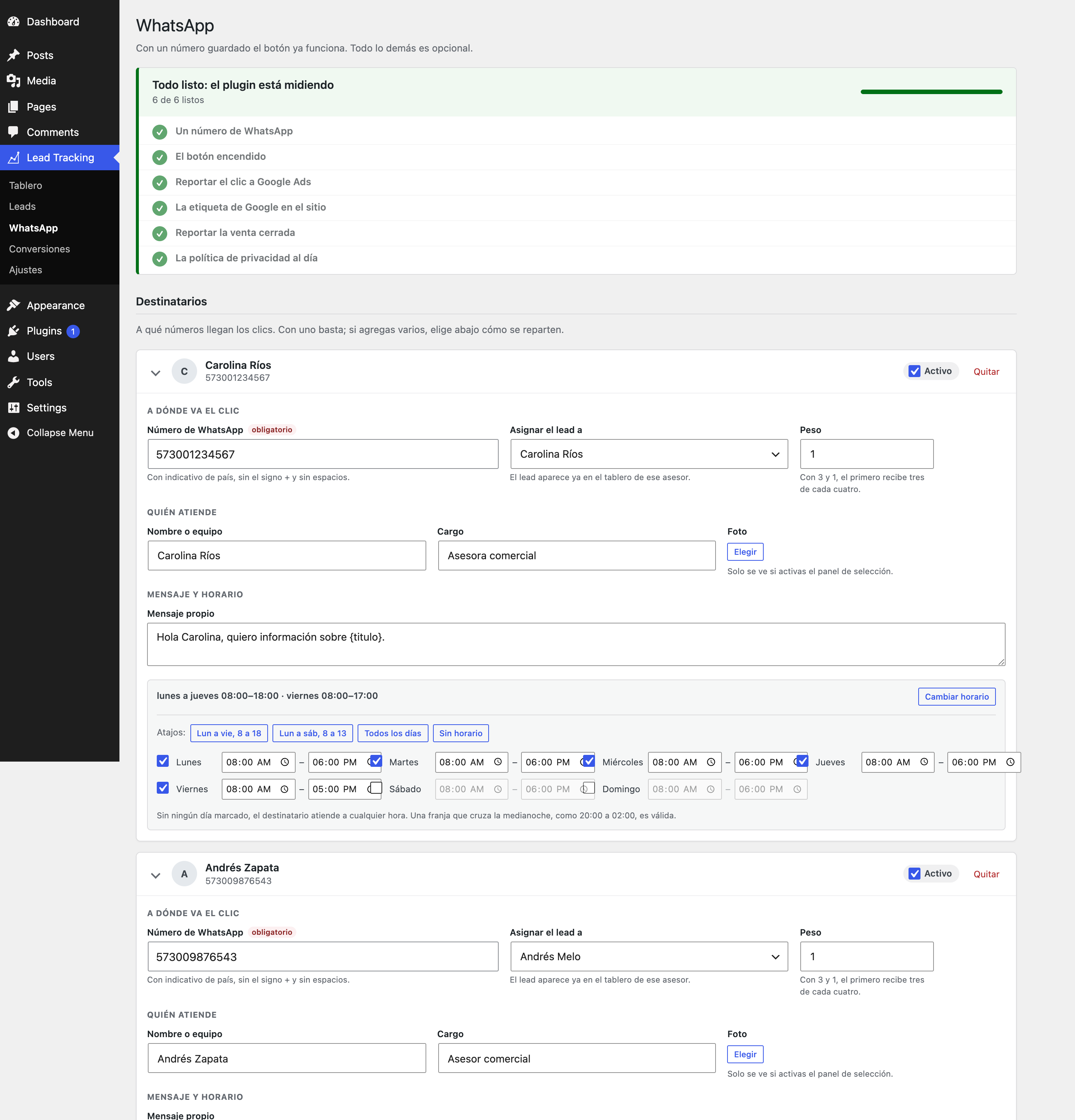
- Go to MasVirtual Lead Tracking WhatsApp and add a phone number. That is enough to get going.
If you serve the site behind full-page caching, purge the cache after activating: the stored HTML does not include the button yet.
সঘনাই উত্থাপিত প্ৰশ্ন
-
No, and this case is expected. MasVirtual Lead Tracking detects the other plugin’s links and measures
them without changing them, which is its default behaviour. You can turn off MasVirtual Lead Tracking’s
own floating button and keep only the measurement. -
Does it work with full-page caching?
-
Yes, that is a design requirement. Nothing that depends on the visitor is generated in
PHP: attribution is resolved in the browser and travels over REST. -
Why does the contrast warning appear with the factory colors?
-
Because it is true: white on the WhatsApp green gives 2.0:1 and does not reach the
recommended 3:1. It is the color pair Meta uses in its own interface and the one people
recognise, so it ships as the default knowingly. If you prefer legibility over
familiarity, darken the background. -
I uninstalled the plugin. Did I lose my leads?
-
No, unless you had ticked the deletion checkbox under Settings. Deactivating never
deletes anything.
পৰ্য্যালোচনা
এই প্লাগিনৰ বাবে কোনো পৰ্য্যালোচনা নাই।
অৱদানকাৰী আৰু বিকাশকাৰীসকল
“MasVirtual Lead Tracking” হৈছে মুক্ত উৎসৰ ছফ্টৱেৰ। এইসকল লোকে এই প্লাগিনত অৱদান আগবঢ়াইছে।
অৱদানকাৰীসকল
আপোনাৰ ভাষাত “MasVirtual Lead Tracking” অনুবাদ কৰক।
বিকাশৰ প্ৰতি আগ্ৰহী?
ক’ড ব্ৰাউজ কৰক, SVN ৰিপজিটৰী চাওক নাইবা RSS-দ্বাৰা বিকাশৰ পঞ্জী ছাবস্ক্ৰাইব কৰক।
সলনি-পঞ্জী
1.3.0
- New: the bubble now tells you when someone who already wrote to you comes back.
The lead reference lives in the visitor’slocalStorageand never expires, so when
somebody already in your funnel returned and tapped the button again, the click was
filed in their record and nothing else happened. No new lead, and the bubble only ever
looked at leads in the “New” stage created in the last few hours — so the advisor never
found out that one of their own customers was writing again. From an incognito window
the same person did show up, because the reference was gone and a second lead was born.
That asymmetry was the giveaway. - Those returns get their own section in the panel, separate from the clicks awaiting
confirmation. Their record is not touched: the stage and the outcome stay exactly
where they were. Sending a closed sale back to “New” would erase the work and could
re-report a conversion that was already reported. It is a notice, not a question. - The panel lost its explanatory paragraphs. Two headings — “New” and “Came back” — and
the rows. An advisor opens this twenty times a day and stops reading the help text after
the second, so all it did was push the buttons further down. - Each return can be dismissed with “Seen”, and comes back if that person taps again.
The acknowledgement is stored as one more entry in the lead’s history, so the record
reads “came back”, “seen by Carolina” rather than just showing a final state. - The whole interface is now available in English. The plugin’s source strings are
written in Spanish, so a site running WordPress in English saw a Spanish admin. All 718
strings are translated and shipped as anen_UScatalogue: the dashboard, the funnel,
the conversion screens, the WhatsApp settings, every warning and every error message.
Other languages still go through translate.wordpress.org as usual. - The acceptance test suites no longer depend on the site’s language. Several of them
check a warning by looking for a word inside its text, and the moment the English
catalogue arrived they started failing on an English site — the code was fine, the
warning appeared, it just said “contrast” where the test looked for “contraste”. A
suite whose result depends on where it runs cannot tell you whether the code works. - Fixed: a method meant for exactly this was dead code.
abierto_por_visitante()
looks for an open lead belonging to the same visitor within a window, and nothing ever
called it. The second deduplication layer the code documents has never run: the only
one in effect is the browser reference.
1.2.1
- Fixed: switching between the board and the list view was a state-changing GET with no
nonce. Thevistaparameter writes the chosen view to user meta, so loading a crafted
URL while logged in flipped someone’s preference behind their back. The damage was small —
their board moved — but a GET that writes without checking where the request came from is
CSRF regardless, and the links are generated by the plugin, so signing them costs nothing.
An absent or expired nonce now falls back to the saved view instead of killing the page: a
stale bookmark is not an attack. - Every query now goes through
$wpdb->prepare(), including the table names. Fifty-two
call sites interpolated the table name into the SQL string, which was the only option
before WordPress 6.2 introduced the%iidentifier placeholder. This plugin requires 6.4,
so there was no reason left to keep doing it. Where theIN (…)list has a variable number
of placeholders, those are still built witharray_fill()— they are generated%dand
%s tokens, never data. - Raw input that ends up in an admin notice is now sanitized where it is stored, not only
escaped where it is printed. Those notices travel in a transient and are rendered on a
later request, so between the two the value is stored data. It is also truncated, because
the point is only to let the person recognise which of their lines failed. - The date filters on the leads screen sanitize before validating.
fecha()was already a
strict allow-list — exactYYYY-MM-DDpluscheckdate()— but doing it in that order
keeps the intent visible on the line itself. - Fixed: the credit-in-footer test checked a screen that no longer existed. It hardcoded
the admin screen id, so the 1.2.0 rename left it asserting against a page nobody could
reach. It now builds the id fromMenu::SLUG. - Corrected the plugin folder name in the testing instructions, which the rename had left
pointing at a directory that does not exist.
1.2.0
- Renamed. The plugin was called “Walead”, a name already used by unrelated commercial
lead-generation and WhatsApp marketing services with overlapping functionality. It is now
“MasVirtual Lead Tracking”, which carries the name of the people who build it and describes
what it does. The rename goes all the way down: text domain, PHP namespace, option and
table prefixes, REST namespace, CSS classes and thedata-attributes you can put on your
own links. If you were usingdata-walead-*attributes or thewindow.waleadobject,
they are nowdata-mvlt-*andwindow.mvlt. - The unconfirmed-clicks bubble can now be dismissed. It shows across the whole admin on
purpose — an advisor may be writing a post when a click arrives — but there was no way to
put it away, which is not a reasonable thing to do to someone else’s dashboard. It now has
a close button, the choice is remembered per user, and dismissing it stops the polling and
the stylesheet from loading outside this plugin’s own screens. Inside them the bubble stays,
and the same button brings it back everywhere. To switch it off entirely there is still the
setting in Settings. - The bubble’s polling interval went from 30 to 60 seconds. It runs on every admin screen, so
at thirty seconds ten advisors with the dashboard open meant 1,200 requests an hour against
a shared host, and a click attended one minute later changes nothing. - Fixed: the dismissal endpoint would never have existed. Its route was registered from
the bubble’s own class, which is only instantiated underis_admin()— and a request to
/wp-json is not. It is now registered alongside the other REST routes, the one place that
runs in both contexts. - The admin menu label is shortened to “Lead Tracking” so it does not wrap onto two lines in
the sidebar. The page title keeps the full name. - The plugin’s own uninstall now removes the bubble’s per-user preference unconditionally,
outside the “delete my data” checkbox. That checkbox exists to protect commercial history,
and an interface flag is not that — leaving it behind would orphan oneusermetarow per
advisor.
1.1.1
- Fixed: in the Canvas view the header count and the board disagreed. Filtering by
outcome said “6 leads” while the board still drew all 28. The outcome filter now
reaches the cards: wins and losses are spread across several stages, so filtering by
outcome trims the board instead of emptying it, and “open opportunities only” is the
query a coordinator runs most. The stage dropdown, which genuinely does not belong in
a board whose columns are the stages, is no longer rendered in that view, and the
header stopped applying it. A control that promises and does not deliver is worse than
an absent one, because it teaches you to distrust the rest. - Fixed: the filter dropdowns could show a filter that was not applied. Browsers
restoreselectvalues on reload and on back-navigation, so the screen could read
“Lost” while the query filtered nothing — and the only hint was the absence of the
“Clear filters” link, which nobody looks at. Reported twice as “the filter is broken”,
and both times it was this. The filter form now declaresautocomplete="off", so what
the controls show is always what was applied.
1.1.0
- Fixed: the export queue accumulated conversions that could never be sent. A lead
that arrived through organic search, direct traffic or Meta never gets agclid, but
a row was queued for it anyway and re-evaluated on every single export, forever. The
“pending export” counter kept a number that matched no real work — the worst kind of
counter, the one that teaches you to ignore it. Rows whose problem is irreversible
are now discarded with their reason, and each one leaves a record in its lead’s
history. Rows that a human can still fix — a missing Google Ads action name, a
conversion time entered wrong — stay pending on purpose, because discarding those
would take the fix out of the hands of the person who can make it. - The
localStoragekey holding the browser-proposed visitor identifier is now
wl_vp instead of sharing thewl_vname with the first-party cookie. They were
always two different things — the cookie is the identity the server decides, and this
is only a proposal — but the shared name made the privacy section look like it
contradicted what an auditor sees in the inspector. - Minimum PHP lowered to 8.0. Nothing in the codebase used 8.1 syntax; the requirement
was conservative and blocked installation on hosts that are still on 8.0. - The readme is now in English, as the plugin directory requires. Spanish and other
translations go through translate.wordpress.org. - Fixed: a PHP notice on every admin screen under WordPress 6.7 and later. The
unconfirmed-clicks notice decided whether to register itself duringplugins_loaded,
and that question read a plugin option — which pulls in the defaults, which carry
translated strings. Asking for a translation beforeinitmakes WordPress load the
text domain too early and complain about it. The same call also ran
current_user_can() before authentication plugins had finished registering, which is
an answer worth not trusting. Both checks now happen inside the hooks that render the
bubble, which run well afterinit. - Removed
load_plugin_textdomain(): WordPress has loaded translations for directory
plugins by itself since 4.6, and calling it beforeinitemits a notice since 6.7.
1.0.9
- Fixed: the page filter did nothing in the Canvas view. It was wired to the PHP
listing but not to the canvas, which loads its cards over REST and never sent the
parameter. The symptom was misleading: the header count did change — PHP computes
that — and the cards did not. - The landing page, in the lead’s attribution. The card now tells the whole story:
“arrived on /afiliacion-transporte/ with campaign arl-transporte and tapped the
button on the home page”. Those are two different questions and until now only one
could be answered. - URLs are shown stripped of gclid and campaign parameters, with the original in the
title and a link to the real page. Normalised with the same function that groups the
report, so what a card says matches the dashboard table.
1.0.8
- Which page each person tapped the button on, which is not the same as where they
came in. Someone can land on a campaign page, not be convinced, browse to the home
page and write from there: looking only at the channel, that landing page looks like
it works. - “Pages that generate clicks” table on the dashboard, with clicks, closed deals,
close rate and value. All four columns together because “clicks” alone misleads: a
page with high volume and zero closes is exactly the one to fix. - Page filter on the Leads screen, populated automatically with the pages that have
received clicks in the last 90 days. - The click page in the lead panel, visible and timestamped, because it is context a
sales rep uses when replying. - Works retroactively: the data has travelled in the event log since the first
version, so the table fills with everything captured to date without any migration. - URLs are normalised before grouping. Without that, every Google Ads click arrives with
its own gclid and twenty clicks on the same page would look like twenty pages.
1.0.7
- Date range and sales rep filters on the Leads screen, in both views. Previously
you could only filter by channel, stage, outcome and search. - Dates are interpreted as whole days in the site’s timezone, not UTC: in Colombia
“today” starts at 05:00 UTC, and without the conversion filtering by today left out
the small-hours leads and included last night’s. - “Unassigned” is an option in the sales rep filter, usually a coordinator’s most
useful query. - A sales rep cannot request another’s leads by changing the parameter: their own filter
is applied after reading it. - A link to clear the filters, visible only when some are set.
1.0.6
- Unconfirmed clicks notice in the admin bar. A counter of clicks awaiting a reply,
and a panel where each is resolved with “Yes, they wrote” or “No, they didn’t”. This
fixes the weakest link in the module: nothing can detect that someone wrote on
WhatsApp — a person records that — and if they don’t, the “Wrote” stage stays empty
and there are no conversions to report to Google Ads. - It appears throughout the WordPress admin, not only on the plugin’s screens: a sales
rep may be anywhere when a click arrives. - “Yes” moves the stage to Wrote and leaves the opportunity open. “No” marks the outcome
as discarded without touching the stage, because that click was never a conversation.
Both are reversible from the lead card. - It only asks about clicks from the last 48 hours, configurable. Without a limit it
would ask for confirmation of clicks from weeks ago that nobody remembers. - A sales rep only confirms their own. It can be switched off under Settings.
- It is a floating bubble with its own number, not a screen notice: it grows on its
own every 30 seconds without reloading, gives a small jump when it rises, and the
number also appears in the tab title — which is the only thing visible when the rep is
on another tab. At zero it stays visible but dimmed, in grey. - Each row shows the exact time of the click next to the relative one, in the site’s
timezone, so the rep can compare it against their chat clock. With the day included
when it is not today. - Newest always on top. If a click arrives with the panel open it is not inserted
automatically: a “1 new click arrived — show” pill appears instead. Inserting it would
push the list just as someone moves the cursor to a button, and in a panel where every
click writes to the database that is not a detail. - The reference is also visible on the board card, monospaced and in amber: it is the
code the person carries in their message, and the rep compares it at a glance.
1.0.5
- No REST route of the plugin can be cached. 1.0.3 protected only the feed and was
too narrow a fix: the problem was the whole namespace. LiteSpeed caches all of
mvlt/v1, authenticated requests included, and that produced three failures that
look nothing alike: - Moving a lead on the board saved correctly but reverted to its previous stage on
refresh — thePATCHwrote and the followingGETread a frozen list. It looked like
saving was failing, and it wasn’t. /turno, which distributes sales reps by strict rotation, handed the same rep to
everybody. That is the worst of the three because nobody would ever have noticed.- And the feed one, already known.
- The lead reference is now visible on the canvas card, monospaced with an amber
background, as the first item in the header. It is the code the person carries in their
WhatsApp message: the rep reads it in the chat and finds the matching card without
opening anything. It is also in thearia-label, for screen reader users.
1.0.4
- You can now delete a lead from the interface, in the listing, with confirmation and
only for users who can configure the plugin: a sales rep corrects a lead, they don’t
make it disappear. - A button to delete all the leads created by “Simulate an event” at once, which used
to pile up and pollute the reports. It appears only if there are any and it goes by the
fake gclid, so it can never reach a real lead. - Fixed: deleting a lead left its conversions orphaned in the queue. The exporter
reported them on every attempt as “the lead no longer exists”, dragging a problem with
no solution forward forever. They are now discarded with their reason recorded.
1.0.3
- Fixed: a page cache could freeze the feed. It was assumed a REST route is never
cached. LiteSpeed does cache them — it has a “Cache REST API” option that is often on —
and the effect was the worst possible: Google requested the URL every day and always
received the same file, usually the empty one from the first request, with the schedule
showing green and zero conversions imported. Found in production, not in testing. - The feed now declares
DONOTCACHEPAGE, fireslitespeed_control_set_nocacheand sends
X-LiteSpeed-Cache-Control: no-cache, which covers LiteSpeed, WP Rocket, W3 Total
Cache, WP Super Cache and Comet Cache. - Enabling or rotating the key purges the URL, because an already-stored entry is served
by the web server without executing PHP and no signal arrives in time. - An on-screen notice explains how to verify it, because no plugin can guarantee the
behaviour of the host’s cache.
1.0.2
- The MV Gclid Store importer now also runs from MasVirtual Lead Tracking Settings, with the full
preview visible above the button. Most shared hosts give no WP-CLI access, and a
migration that can only be run from a terminal is a migration that does not get run. - The preview is the real run in dry mode — the same path and the same decisions, without
writing — and not a separate simulation that might not match what happens when you
press the button. - The block only appears if something is left to import, and disappears when it isn’t.
1.0.1
- Importer from MV Gclid Store.
wp mvlt importar-mvbrings the leads from the
previous setup preserving their state. The singleestadofield, which mixed funnel
position and outcome, is split into MasVirtual Lead Tracking’s stage/outcome pair. It also brings the
gclid as first touch and respects the original click time, without which imported leads
would be neither exportable nor useful for any report by date. It has--en-seco, it is
idempotent, and it deliberately does not queue conversions: the ones already reported
from the previous setup would be duplicated under a different Order ID.
1.0.0
- Scheduled feed for Google Ads. A keyed URL that Google fetches on its own schedule,
from Goals Conversions Uploads Schedules, with HTTPS as the source. It supports
the optional username and password Google offers. Disabled by default; the key is
rotated or switched off in one click. - File format corrected against Google’s specification. First row
Parameters:TimeZone, headers without quotes, and the UTC offset in four digits. The
time was also not being written in the right zone: it was formatted in UTC with the
local offset appended, which shifted every conversion by five hours in Colombia and
moved small-hours ones to the wrong day. - Consent columns
Ad User DataandAd Personalization, required by the EU user
consent policy. - The visitor cookie is written by the server, not by
document.cookie. A cookie set
over HTTP does not fall under the seven-day cap Safari applies to anything a script
writes, so the attribution window is respected on iOS. And the server recognises a
returning visitor even if the browser lostlocalStorage, which previously counted them
as a new visitor on every load. - Exported conversions leave a record on the lead card. Previously the history said
“queued for export” forever, even months after Google had received it.
0.1.0
- First release: attribution capture, the complete WhatsApp module, Google Ads conversions
with diagnostics and export, tables, roles, privacy and purging.